
8 Ball Pool Billiards Match
Reviews
8 Ball Pool Billiards Match offers a polished pool experience with authentic ball physics and precise controls. The 5 difficulty levels provide a steady challenge, while the 320 unique tasks encourage creative shot-making. The variety of cue designs adds a personal touch. A solid choice for casual and dedicated players alike.
About this game
Game Introduction
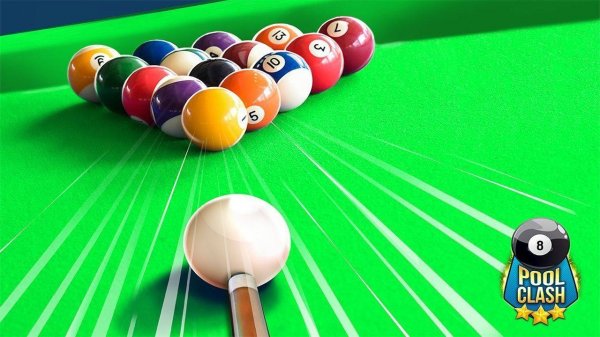
8 Ball Pool Billiards Match brings the classic billiard table experience to your screen. The game focuses on realistic physics and precise controls, allowing you to adjust angle and power for each shot. You choose between solids or stripes and aim to pocket all your balls before sinking the 8 ball to win. With a single player mode that includes 5 difficulty levels, the game provides a steady learning curve. Additionally, there are over 320 unique challenges that test your skills in creative ways. The advanced physics engine ensures every ball moves authentically, making each match feel like a real game of pool.
How to Play
Start by selecting one of 23 unique cue designs. Use the on-screen buttons to set the angle and power of your shot. Aim carefully at the cue ball, then strike to hit your target balls. The goal is to pocket all assigned balls (solids or stripes) before the 8 ball. In single player mode, you progress through increasingly difficult levels. For extra variety, try the challenge mode with over 320 tasks that require creative shot-making.
Game Features
Complete 5 difficulty levels that gradually increase in challenge. Discover over 320 unique challenges that test your precision and strategy. Select from 23 distinct cue designs to personalize your play. Perform accurate steering and tricks with the intuitive control system. Enjoy an advanced physics engine that simulates realistic ball movement and collisions.
Tips for Success
To improve your game, practice regularly to master the angle and power controls. Focus on planning your shots several moves ahead, as positioning the cue ball for your next shot is key. Experiment with different cue designs to find one that feels comfortable. Take advantage of the challenge mode to learn creative shot techniques. Finally, be patient—progressing through the difficulty levels will naturally sharpen your skills.


Leave a comment